Server-side
Path Traversal: The Complete Practical Guide
What path traversal is, how to read arbitrary files, climb directories, bypass filters, and prevent it. With free labs to practice on.
Published
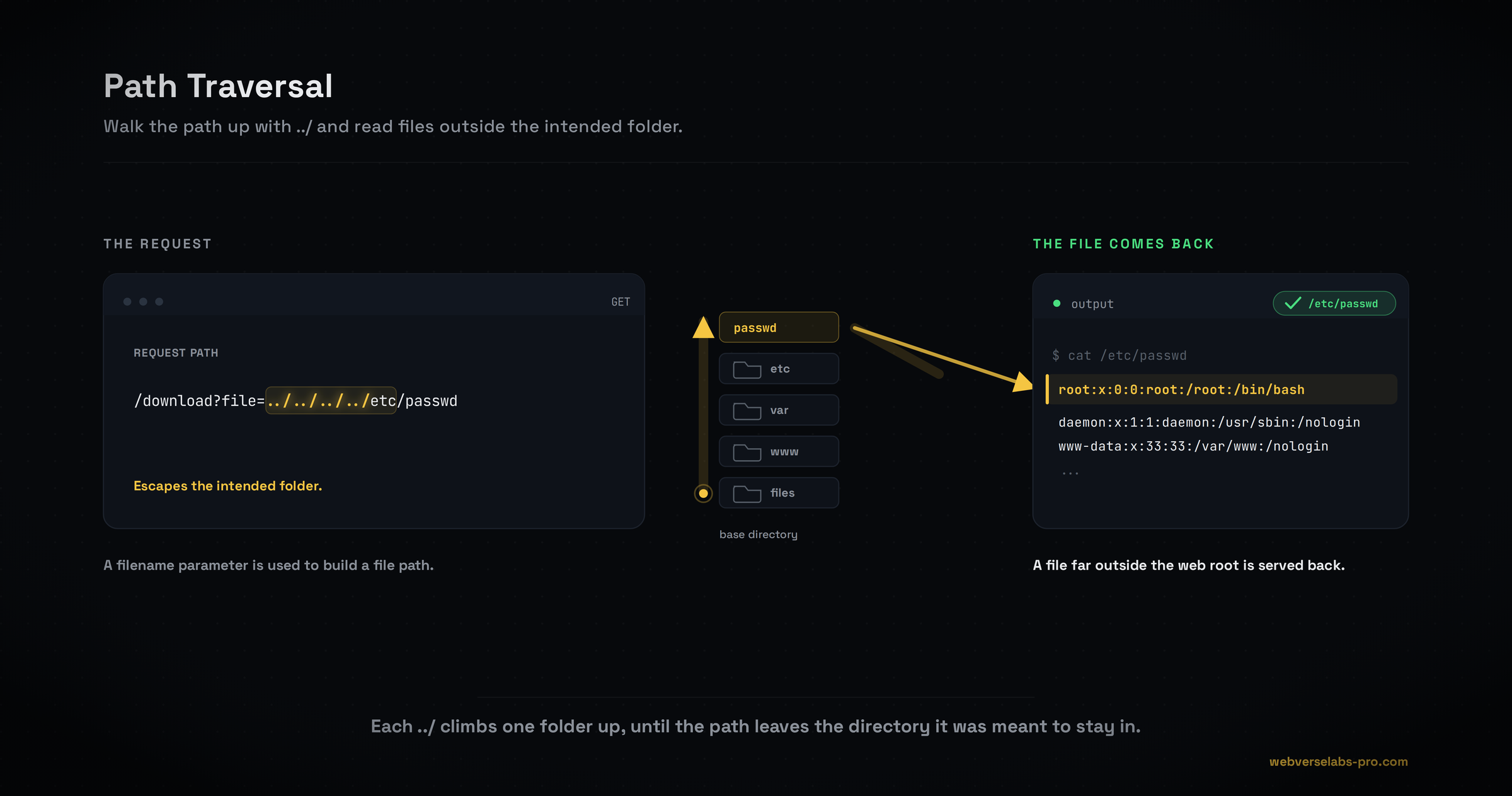
Path traversal is what happens when an application lets you choose a file inside a folder, and you escape that folder. A feature meant to serve report.pdf from a downloads directory is handed ../../../../etc/passwd instead, joins it onto the base path without checking, and reads whatever you pointed at. It is one of the oldest web bugs and still everywhere, because download, export, preview, and template features concatenate user input into filesystem paths constantly. The payoff is arbitrary file read: source code, secrets, SSH keys, and the escalation paths that follow. Want to feel it rather than read about it? Sign up free and try it on a live target.
What is path traversal?
The mental model in one sentence: input meant to name a file inside a folder is bent to point outside it. The application has a base directory, like /var/www/files/, and appends your filename to it. If you supply a normal name you get a normal file. If you supply ../, the dot-dot climbs one directory up, and enough of them walk you back to the filesystem root, from which you can descend into anything the process can read.
The bug is not the ../ itself, it is that the server trusts the joined path without canonicalizing it and confirming it still lives inside the base directory.
How the bug gets built
It is almost always a convenience that skipped one check:
# vulnerable: user filename is joined to the base dir with no containment check
base = "/var/www/files/"
path = base + request.args["file"]      # file=../../../../etc/passwd
return open(path).read()
open("/var/www/files/../../../../etc/passwd") resolves to /etc/passwd, and the contents come back. A safe version canonicalizes the result and verifies it still starts with the base directory before opening.
Path traversal vs LFI vs arbitrary file read
Three overlapping terms worth keeping straight:
- Path traversal bends a path to read (or write) a file outside the intended directory.
- Arbitrary file read is the outcome: you can read files you should not.
- Local file inclusion (LFI) is when the file the app loads gets executed or interpreted, which turns a read into code execution.
The same ../../../../etc/passwd confirms all of them. The difference is what the app does with the file: return the bytes (traversal) or run them (inclusion). This cluster covers reading. The execution escalation (PHP wrappers, log poisoning, remote inclusion) is a separate topic.
Impact
Reading arbitrary files is high-impact on its own:
- Source code reveals other vulnerabilities and hardcoded secrets.
- Config files (
.env,config.php,web.config) carry database credentials and API keys. - SSH private keys and
~/.bash_historycan hand you direct access. /proc/self/environleaks environment variables and secrets.
And file read frequently chains upward: a leaked secret or key becomes authentication, and in the right conditions a write or an inclusion becomes remote code execution.
How to find path traversal
Look for parameters that name a file: file, path, page, template, download, doc, lang, view. For each:
- Probe with a single dot-segment first. Send
./report.pdfor a one-level../and watch whether the response changes or errors. - Climb one level to a file you expect to exist nearby, to confirm the directory actually moves.
- Read the signals. A different error ("file not found" vs a permission error), a different response length, or actual file contents all tell you the path moved.
Then escalate through the bypass ladder.
The bypass ladder
Defenses get layered, and each has a defeat, covered in the spokes:
- Plain traversal reads files when there is no filter. See reading arbitrary files.
- Separators and absolute paths handle Windows and base-directory-ignored cases. See traversal sequences and absolute paths.
- Filter bypass defeats a server that strips
../once, or that you encode around. See bypassing filters. - Extension and suffix tricks handle a server that forces a
.htmlsuffix. See extension and suffix tricks.
A worked example
Say a download endpoint serves a file by name. You request a normal file and it works, so you climb one level to confirm the directory moves:
GET /download?file=../index.html HTTP/1.1
Host: target.exampleHTTP/1.1 200 OK
Content-Type: text/html
<!doctype html><title>Home</title>...The ../ served a file from one directory up, so traversal works. Now over-climb past the root (extra ../ are harmless, they just stop at /) and descend to the classic read-confirm:
GET /download?file=../../../../../../etc/passwd HTTP/1.1
Host: target.exampleHTTP/1.1 200 OK
Content-Type: text/plain
root:x:0:0:root:/root:/bin/bash
daemon:x:1:1:daemon:/usr/sbin:/usr/sbin/nologin
www-data:x:33:33:www-data:/var/www:/usr/sbin/nologin/etc/passwd came back. From here you pivot to the files that matter: the app's .env, source, or SSH keys.
Prevention
- Prefer an indirect map. Accept an id or a short name and look up the real path server-side, never concatenate raw input.
- Canonicalize, then verify inside the base. Resolve the path (
realpath,Path.GetFullPath) and confirm it still starts with the intended directory before opening. - Allow-list the filename and extension, and reject anything containing a separator or
..or an encoded variant. - Decode once, fully, before validating, so a double-encoded sequence cannot slip past a single-pass filter.
- Least privilege. The web user should not be able to read
/etc/shadow, SSH keys, or other apps' files. Chroot or containerize so a successful read hits nothing valuable.
The full detail is in preventing path traversal.
Where it connects
Path traversal is the read side of a family. File upload has the write side: directory traversal in an uploaded filename drops a file outside the upload folder, the same bug pointed at writing instead of reading. And when a read is not enough, OS command injection and XXE are other routes to pulling files off a host or escalating to code execution.
Where to go next
Work through the cluster in order, or jump to what you need. Start with reading arbitrary files, then traversal sequences and absolute paths and bypassing filters. When you want every payload in one place, the path traversal cheat sheet has them. And when you are ready to break something real, sign up free and start hacking.