Server-side
File Upload Vulnerabilities: The Complete Practical Guide
What file upload vulnerabilities are, how to exploit them (web shells, content-type and extension bypass, polyglots), and how to prevent them. With free labs.
Published
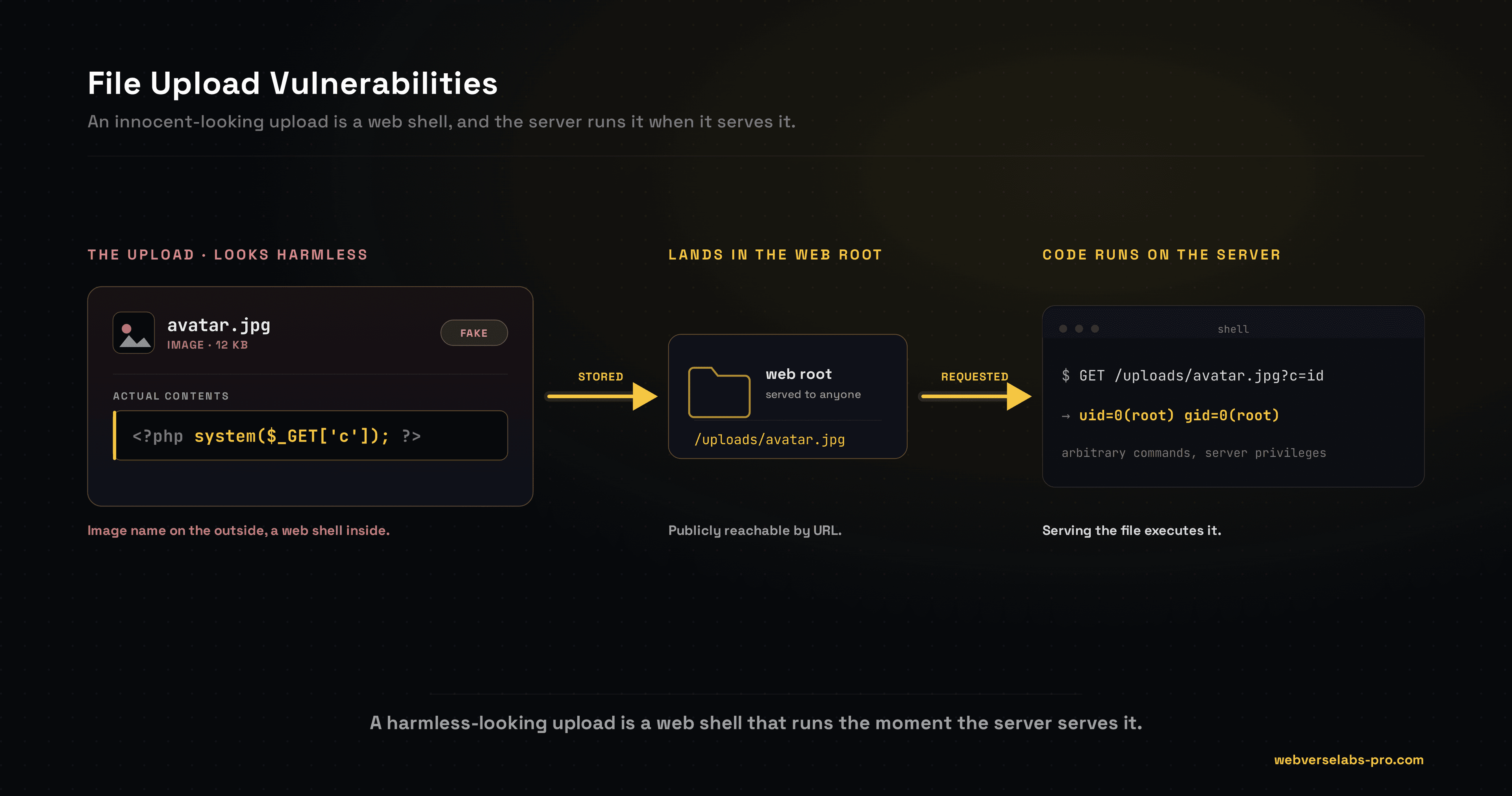
A file-upload vulnerability is any upload feature that lets you control enough of the stored file, its contents, type, name, or location, to turn it into an attack. A single avatar or document upload is one of the most reliable routes to a web shell, because so many apps trust the filename, trust the content type, and drop the file somewhere it can be executed. Most guides treat this as one shallow page, but real targets need the full ladder: content-type, magic-byte, and extension bypasses, path traversal in the filename, polyglots, races, and the non-RCE angles when a shell is out of reach. Want to feel it rather than read about it? Sign up free and try it on a live target.
What is a file-upload vulnerability?
The mental model in one sentence: you control a file the server will later store, serve, or parse, so you make it do something it should not. The upload itself is never the bug. The bug is what the server does with a file whose contents, name, type, or destination you chose, and how little it checks before trusting it.
The two questions that decide everything
Before trying any payload, answer two questions. They tell you whether an upload is exploitable and how:
- Can I control the contents? Can I put my own bytes in the stored file, or does the server re-encode it into something I no longer control?
- Will the server execute or serve it from a reachable path? Does the file land somewhere I can request, and does the server run it (a web root that executes PHP) or serve it inline (so an SVG runs as script)?
If both answers are yes, you likely have RCE. If only the first is, you are looking at the non-RCE angles. This checklist drives everything below.
How uploads get validated, and how each check fails
Apps defend uploads with a handful of checks, and each one has a bypass:
- Extension filtering trusts the name. Beaten with alternate executable extensions, case tricks, double extensions, and config-file drops. See extension blacklist bypass.
- Content-Type checking trusts a header you send. Beaten by simply lying, and by prepending real image magic bytes. See content-type and magic-byte bypass.
- Magic-byte sniffing trusts the first bytes. Beaten by a polyglot that is a real image and a real script at once. See polyglots and image parsers.
- Image re-encoding is the strong one: it decodes and re-saves, destroying embedded code. Beaten only by parser bugs or by not needing code in the first place.
Map the check in front of you to its bypass, then pick the payload.
Impact
What an upload gets you depends on where the file lands and what the server does with it:
- Web shell leading to RCE when the file executes from the web root.
- Stored XSS when an SVG or HTML upload is served inline.
- XXE when an uploaded Office document or SVG is parsed server-side.
- SSRF when the server fetches or previews your file.
- Denial of service from a decompression bomb.
- Overwriting files (config, cron, keys) via path traversal in the filename.
RCE is the headline, but the others are real findings on the many apps that re-encode images yet still render an SVG or parse a document.
How to find the weak spot
Probe the upload before you attack it:
- Where does the file land? Upload something benign and find its stored URL. Is the path predictable?
- Does the server run or serve it? Request the file and watch the response. Does it execute, render inline, or download as an attachment?
- What does a read trigger? Some servers parse the file on upload or on preview, which opens XXE and SSRF even without execution.
The answers tell you which rung of the ladder to start on.
The bypass ladder
Work the ladder from cheap to advanced:
- Content-Type spoofing and magic bytes when the check trusts the header or the first bytes.
- Extension blacklist tricks when the filter blocks some extensions but not all.
- Path traversal in the filename to place the file where you want it.
- Polyglots and image-parser bugs when the server re-parses the file as an image.
- Upload race conditions when a file is validated and deleted just after it is written.
- PUT-based uploads when the web server itself accepts a raw write.
When none of those reach code, the non-RCE exploits still deliver stored XSS, XXE, SSRF, and DoS.
A worked example
Say a profile page lets you upload an avatar. You try a plain web shell named shell.php and the server rejects it, extension not allowed. The filter is a blacklist, so you reach for an alternate PHP extension and rename it shell.phtml. This time it is accepted and stored at a predictable path under the avatars directory.
You request that URL with a command in the query string, and the server runs your code and returns the output. One avatar field became a web shell. If .phtml had also been blocked, the next rungs are a double extension like shell.php.jpg on a lax handler, or an .htaccess drop that makes the server treat your .jpg as PHP. That is the loop: find the reachable path, get executable content to land there, then trigger it.
Prevention
- Allow-list the extension and validate server-side. Never trust the client, the
Content-Typeheader, or a blacklist. - Re-encode images (decode and re-save) and strip metadata, so any embedded code or entity is destroyed.
- Rename every upload to a random server-generated name with one fixed, safe extension. Discard the user's filename entirely.
- Store outside the web root and serve through a handler that forces a safe
Content-TypeandContent-Disposition: attachment. - Disable script execution in the upload directory, cap file size, scan contents, and disable external entities when parsing XML, Office, or SVG files.
The full defensive detail is in preventing upload flaws.
Where to go next
Work through the cluster in order, or jump to what you need. Start with web-shell upload, then content-type and magic-byte bypass and extension blacklist bypass. When you want every payload in one place, the file upload cheat sheet has them. And when you are ready to break something real, sign up free and start hacking.